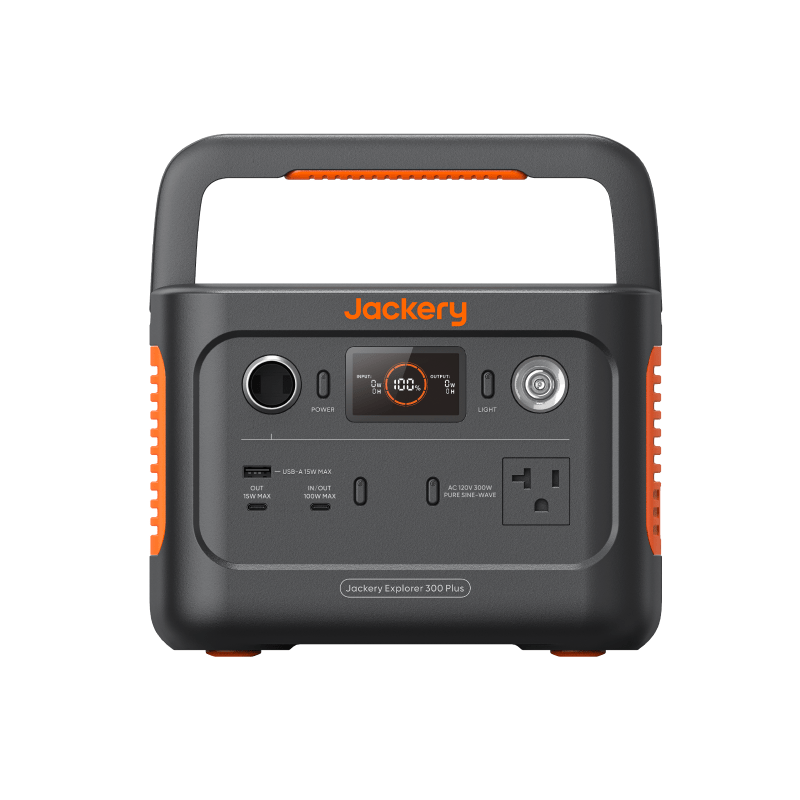
Working without an outlet is mostly a planning problem, not a gear problem. A laptop, a phone, and a connection draw surprisingly little power — the trick is knowing your real numbers, picking the smallest battery that covers them, and having a recharge rhythm so every session starts full.
Your actual power budget
Start by adding up what a working day really draws. Here’s a realistic budget for a common remote setup:
| Device | Typical average draw | Hours used | Energy per day |
|---|---|---|---|
| Laptop (mainstream) | 30–50W | 8 | 240–400Wh |
| Phone (charging) | 5–10W | 2 | 10–20Wh |
| Mobile hotspot | 3–8W | 8 | 25–65Wh |
| Portable monitor (optional) | 8–15W | 8 | 65–120Wh |
| Total (no monitor) | ~275–485Wh | ||
| Total (with monitor) | ~340–605Wh |
Two notes on that table. Laptop average draw is much lower than the charger’s rating — a 100W charger mostly loafs along at 30–50W unless you’re compiling, rendering, or gaming. And these are watt-hours consumed by the devices; the battery supplying them loses some in conversion, so a “full day” battery needs roughly 15–20% more capacity than the total. The Power Station Sizing Calculator does that adjustment for you, and the Device Wattage Library has ranges for gear not listed here.
The headline: most remote-work days fit inside 300–500Wh. This is a small-battery problem, not a big-battery problem.
One honest caveat: video calls change the math. A day of back-to-back calls keeps the camera, screen at full brightness, and CPU busy, and can push laptop draw toward the top of its range or past it — budget an extra 50–100Wh for a call-heavy day. The same goes for outdoor screen brightness, which quietly costs more than people expect.
Power bank or small power station?
This is the central buying decision, and it maps cleanly to how you travel:
- A large power bank (~90Wh, 25,000mAh class) weighs about a pound, slips in a laptop bag, charges a modern laptop over USB-C, and is allowed in airline carry-on. It buys roughly 1.5–2 extra laptop hours plus phone top-ups. If your pattern is “mostly outlets, occasionally stranded,” this is the right tool and the cheaper one.
- A small power station (300Wh class) weighs 7–10 pounds, adds an AC outlet and more ports, and covers a full unplugged workday. It doesn’t fly, but it lives happily in a car trunk or a van. If your pattern is “regularly working where outlets don’t exist,” this is the tool.
Plenty of experienced remote workers carry both: the power bank in the bag every day, the station in the vehicle for planned off-grid days. If you’re weighing a full outlet-free workday specifically, the laptop battery backup guide runs that scenario in detail.
Connectivity: the cheapest watts you’ll spend
Internet is the anxiety load, but it’s a rounding error in the budget. A phone in hotspot mode, a dedicated mobile hotspot, or a travel router draws single-digit watts. Even a satellite internet terminal — the power-hungriest connectivity option, at roughly 25–50W — is modest next to a laptop.
The practical implication: never let connectivity fears push you into a bigger battery class. A hotspot that runs all day costs about 50Wh. If your work depends on staying online through outages and travel days, the backup internet power planning guide covers the connectivity side properly.
Recharging between sessions
Batteries make you portable; the recharge plan makes you sustainable.
- Car charging is the workhorse. A standard 12V port delivers roughly 60–100W, so an hour of driving puts something like 60–100Wh back — a 3-hour drive can substantially refill a 300Wh station. If you drive between work sessions, the car quietly becomes your generator.
- Overnight wall charging at home, a hotel, or a campground pedestal resets everything. Many small stations refill from the wall in 1–3 hours.
- Solar is optional at this scale. A 60–100W folding panel can keep a small station alive indefinitely in good sun, but for most remote workers, car and wall charging are simpler and more reliable.
The cafe-plus-battery pattern
The most common real-world rhythm isn’t fully off-grid — it’s hybrid. Morning at a cafe or coworking space with everything plugged in and the power bank refilling; afternoon at the park, the car, or the trailhead running off the bank; evening recharge wherever you sleep. In this pattern the battery isn’t your power source, it’s your power bridge, and a ~90Wh bank bridges 2–4 hours easily. Buy for the bridge you actually cross, not the expedition you imagine.
Weight vs runtime: the honest tradeoff
Every hour of runtime is weight you carry:
- ~90Wh power bank: ~1 lb — a couple of laptop hours
- 300Wh station: 7–10 lb — a full workday
- 500Wh station: 12–15 lb — a long day with a monitor, or two lean days
The step from power bank to station is the step from “in my bag” to “in my vehicle.” Be honest about which one matches your life. A battery that’s too heavy to bring is worth exactly zero watt-hours. If you’re carrying cameras, drone batteries, chargers, lights, and a laptop, move the whole kit into the Camera & Drone Power Planner so energy capacity and simultaneous output stay separate.
Next steps
- Put your laptop’s real wattage and your target hours into the Power Station Sizing Calculator to get a capacity class.
- Add camera/drone refills and lighting with the Camera & Drone Power Planner when the workday is also a field shoot.
- Compare the power bank and small station classes side by side in the comparison hub.
- Check your exact devices against the Device Wattage Library so your budget uses real numbers, not guesses.